If you’re analyzing real documents at scale—contracts, government notices, quality manuals, or industry standards—you need precision beyond fuzzy search. Here’s a practical approach with GraphRAG powered by my Dream Stack: Microsoft Agent Framework + Microsoft Foundry + Neo4j. In practice, this combination consistently yields higher‑quality answers because the graph preserves relationships that vectors alone miss.
Why GraphRAG for Contract Analysis?
Here’s the problem: traditional RAG hits semantic search on a vector database, retrieves some chunks, and hands them to an LLM. It works, but it’s flat. You lose relationships, structure, and context.
GraphRAG changes this. By storing contract data in a Neo4j graph database, we preserve the relationships:
- Which organizations are parties to which contracts?
- What clauses exist across different agreements?
- How are governing laws connected to incorporation countries?
Then we combine three retrieval strategies:
- Structured queries - Direct Cypher queries for precise data
- Vector search - Semantic similarity on embedded text excerpts
- Text-to-Cypher - Natural language → graph queries
The agent decides which tool to use. That’s the orchestration layer doing real work.
The Dream Stack: Microsoft Agent Framework + Microsoft Foundry + Neo4j
I wanted to keep this demo focused on the agent pattern, so I used:
- Microsoft Agent Framework - My go-to for building production-ready agents with Azure OpenAI Responses API
- Microsoft Foundry - GPT-5 for reasoning and embeddings (Responses API + Embeddings) powering orchestration
- Neo4j - Graph database with native vector search (I used Aura Free, works great)
The architecture is simple:
Building the Agent: Hands-On Walkthrough
1. Define Your Graph Schema
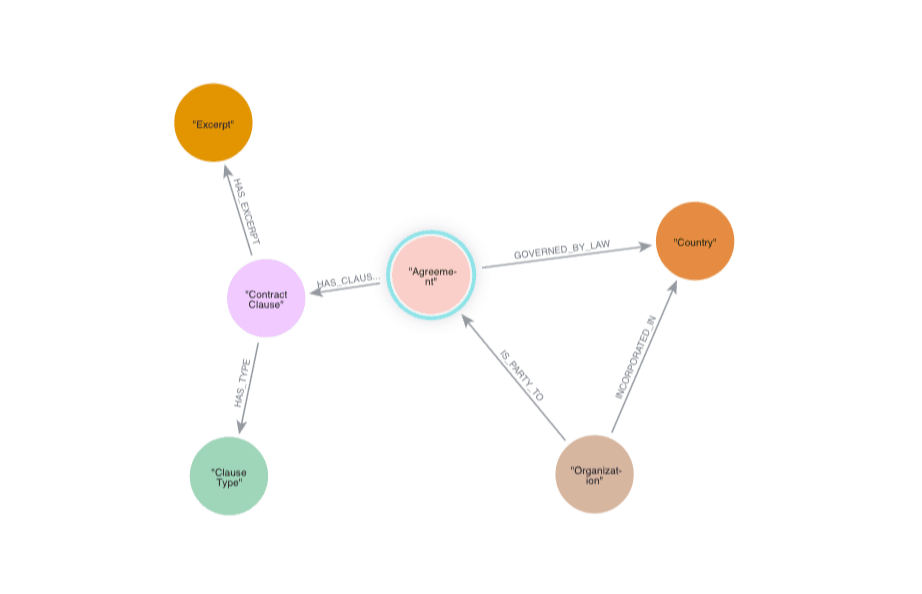
First, design your knowledge graph. For contracts, I modeled:
Nodes:
Agreement- Contract documentsOrganization- Companies involvedCountry- JurisdictionsContractClause- Individual clausesClauseType- Categories (Price Restrictions, Insurance, etc.)Excerpt- Text chunks with embeddings
Relationships:
IS_PARTY_TO- Organizations → AgreementsHAS_CLAUSE- Agreements → ClausesHAS_EXCERPT- Clauses → Text excerptsGOVERNED_BY_LAW,INCORPORATION_IN- Jurisdictional links
2. Create Agent Tools with GraphRAG Queries
Here’s where it gets interesting. I wrapped Neo4j queries as agent function tools:
from contract_graphrag.contract_service import ContractSearchService

class ContractTools:
    """Agent function tools for contract review."""

    def __init__(self):
        self.service = ContractSearchService()

    def get_contract(self, contract_id: int) -> dict:
        """Retrieve full details for a specific contract."""
        return self.service.get_contract_by_id(contract_id)

    def get_contracts_by_organization(self, org_name: str) -> list[dict]:
        """Find all contracts where an organization is a party."""
        return self.service.get_contracts_by_organization(org_name)

    def search_contracts_by_similarity(self, query: str, limit: int = 5) -> list[dict]:
        """Semantic search across contract excerpts using vector embeddings."""
        return self.service.semantic_search(query, limit)

    def query_with_natural_language(self, question: str) -> dict:
        """Convert natural language to Cypher query and execute."""
        return self.service.text_to_cypher(question)
Each tool maps to a different retrieval strategy. The agent decides which one fits the user’s question.
3. Wire It to Microsoft Agent Framework
Creating the agent is straightforward with Azure OpenAI Responses API:
from agent_framework.azure import AzureOpenAIResponsesClient
from azure.identity import DefaultAzureCredential

credential = DefaultAzureCredential()

agent = AzureOpenAIResponsesClient(credential=credential).create_agent(
    instructions="""You are a contract review assistant with access to a knowledge
    graph of agreements, organizations, clauses, and jurisdictions. Use your tools
    to answer questions accurately. Prefer structured queries when IDs or names are
    known, semantic search for conceptual questions, and natural language queries
    for complex relationships.""",
    name="ContractReviewAgent",
    tools=[
        tools.get_contract,
        tools.get_contracts_by_organization,
        tools.search_contracts_by_similarity,
        tools.query_with_natural_language,
    ],
)
The agent instructions guide tool selection. I kept them concise—no need for prompt engineering gymnastics here.
4. Query the Agent
Here’s what happens when you ask: “Find contracts for AT&T with Price Restrictions but no Insurance clauses”
- Agent calls
get_contracts_by_organization("AT&T") - For each contract, checks clause types
- Filters results
- Returns structured answer
Or: “Show me contracts mentioning product delivery requirements”
- Agent calls
search_contracts_by_similarity("product delivery requirements") - Vector search finds semantically similar excerpts
- Returns matching contracts with highlighted excerpts
The orchestration is automatic. The agent picks the right tool.
What I Learned: Tradeoffs & Honest Reflections
What works really well:
- 🚀 Graph relationships beat flat vectors - Questions like “which organizations share governing law?” are trivial with Cypher
- 🤖 Tool orchestration is powerful - The agent switching between structured/semantic/natural language queries feels like real intelligence
- 💡 DefaultAzureCredential is clean - No credential juggling;
az loginjust works - 🛠️ Neo4j Aura Free is perfect for demos - Free tier, cloud-hosted, vector search included
What’s still challenging:
- Text-to-Cypher needs guardrails - LLMs can generate invalid queries; I added retry logic and validation
- Graph design is upfront work - You need to model relationships carefully or queries fall apart
- Context window limits - I chunk excerpts to ~500 tokens; longer contracts need pagination
Not production-ready yet:
- No multi-turn conversation memory (agent resets each query)
- No guardrails for PII/sensitive clauses
- Limited error handling for malformed PDFs
- Neo4j connection pooling could be better
This is a demo to explore the pattern, not a product. If you’re building something similar, expect to add auth, monitoring, and proper error handling.
Try It Yourself
I’ve open-sourced the full project with MIT license:
Quick start (requires Python 3.12+, Azure OpenAI, and Neo4j):
# Clone and setup
git clone https://github.com/iLoveAgents/agent-framework-graphrag-neo4j.git
cd agent-framework-graphrag-neo4j
uv sync

# Configure environment
cp .env.example .env
# Edit .env with your Azure OpenAI and Neo4j credentials

# Authenticate with Azure
az login

# Build the graph (sample contracts included)
uv run 02_build_graph.py

# Run the agent
uv run 03_agent.py --demo
The demo runs six queries to showcase different retrieval patterns. Or launch the browser UI:
uv run devui.pyOpens at http://127.0.0.1:8080 with a visual trace viewer—super helpful for debugging tool calls.
Where GraphRAG Fits in Enterprise Workflows
This isn’t just a demo pattern—I see real enterprise use cases:
Legal/Compliance:
- Contract risk analysis across thousands of agreements
- Clause comparison and anomaly detection
- Regulatory compliance checks with graph traversals
Knowledge Management:
- Technical documentation with linked concepts
- Customer support with product relationship graphs
- Internal policy networks
Financial Services:
- Investment portfolio relationships
- Risk correlation analysis
- Regulatory reporting with structured queries
The key is: when relationships matter as much as content, GraphRAG wins.
Let’s Build Together 🤝
What are you building with GraphRAG? Have you combined knowledge graphs with agent orchestration?
I’d love to hear your stories:
- What retrieval strategies work best for your domain?
- How do you handle graph schema evolution?
- Any gotchas with text-to-Cypher generation?
Drop a comment, open an issue on GitHub, or reach out on LinkedIn. We’re building in public and sharing what we learn.
Let’s make agent orchestration practical for everyone. 🚀