
Shit in, shit out.
AI agents, copilots & RAG — no matter how advanced the model, they all follow the same old rule. If your input documents are messy and your extraction schema is vague, the output will be unreliable. Faster retrieval doesn’t fix bad inputs — it just surfaces them more efficiently.
Content Understanding is about fixing the input layer: turning raw documents into structured, well-defined signals that models can actually reason over. It’s a Foundry tool that builds on Document Intelligence — combining its proven extraction capabilities with LLM-powered field understanding.
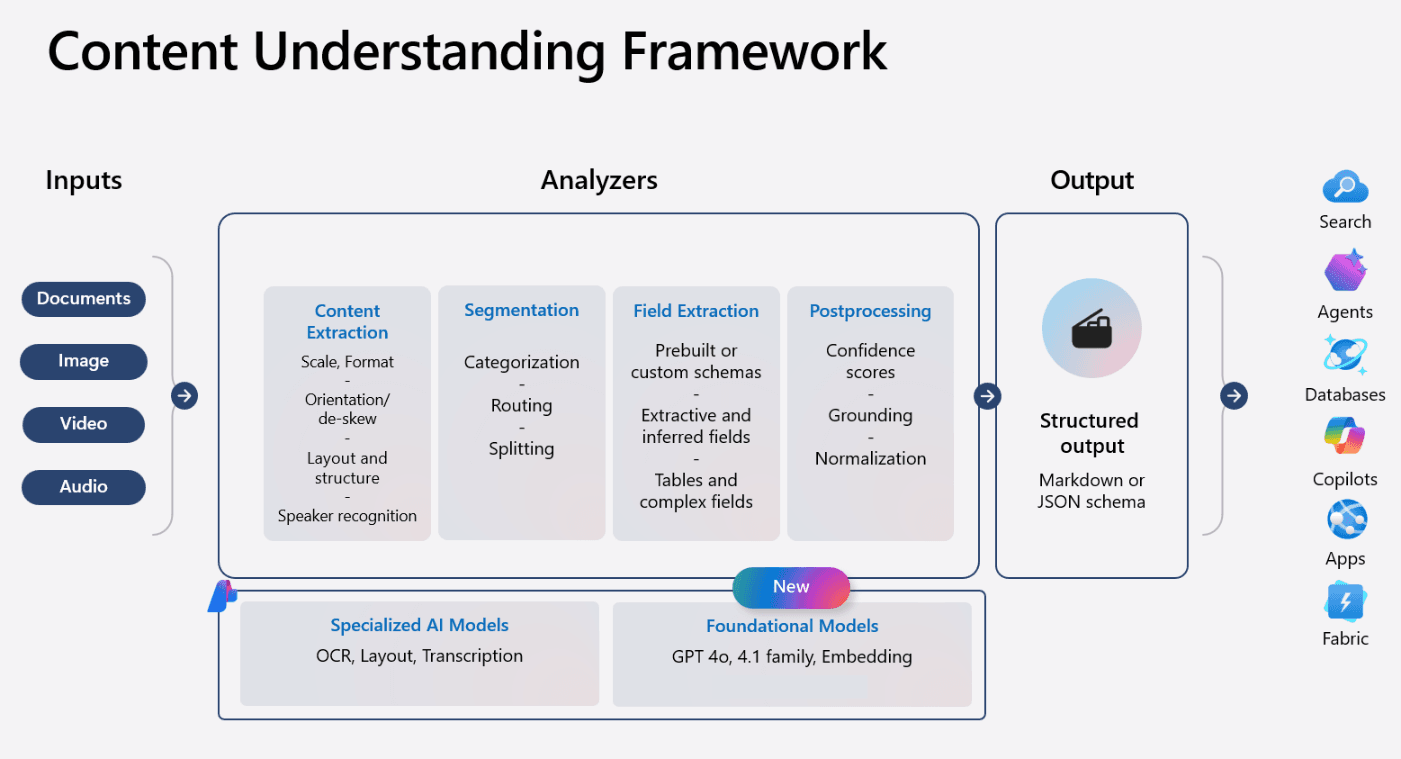
Content Understanding: Documents, images, video, audio → Analyzers → Structured output for search, agents, databases, copilots — Source
I wanted to see how much that really matters in practice. So I ran a benchmark.
Using Microsoft Foundry’s Content Understanding service, I evaluated clause detection on the CUAD legal contract dataset — and compared results against the ContractEval benchmark. The first run was okay. The real gains only came once I treated schema descriptions as prompts and tuned them with the same care as model inputs.
Results
| System | Micro F1 | Precision | Recall |
|---|---|---|---|
| Azure Content Understanding | 83.5% | 84.5% | 82.4% |
| GPT-4.1 mini (ContractEval, Aug 2024) | 64.4% | — | — |
50 contracts. 41 clause types. Same test set as the published benchmark.
The Key Insight: Schema Descriptions Are Prompts
Here’s what made the difference: field descriptions are prompts.
A simple field name like MostFavoredNation tells the model what to find. A well-crafted description tells it how — where to look, what phrasings to match, what format to expect.
Before:
MostFavoredNation: "Most favored nation clause"After:
MostFavoredNation: "Most Favored Nation clause guaranteeing party receives
terms at least as favorable as those offered to any third party. Typically
found in pricing or terms sections. Look for: 'most favored nation', 'MFN',
'no less favorable than', 'pricing parity', 'equivalent to the best terms'."
That’s the difference between “okay” and “great” — and it applied across all 41 clause types.
Schema Best Practices
Following Azure Content Understanding best practices:
| Practice | Example | Why it works |
|---|---|---|
| Affirmative language | ”The date when…” not “Find the date” | Clearer target |
| Location hints | ”Look in the preamble” | Reduces search space |
| Concrete examples | ”e.g., ‘Master Services Agreement‘“ | Anchors understanding |
| Common phrasings | “‘governed by’, ‘construed under‘“ | Improves recall |
The notebook includes optimized descriptions for all 41 clause types — use them as a starting point.
Try It Yourself
git clone https://github.com/iLoveAgents/microsoft-foundry-content-understanding-cuad-benchmark.git
cd microsoft-foundry-content-understanding-cuad-benchmark
You’ll need a Microsoft Foundry project with Content Understanding enabled. Full setup in the README.
Why This Matters
If you’re building document workflows — contract review, compliance, intake automation — this benchmark tells you:
- Content Understanding is production-grade: 83.5% F1 on a complex legal task.
- Schema design is the lever: Not model size. Not retrieval speed. The input layer.
- It integrates with Foundry: Same project, same credentials, same stack.
The model didn’t change between my first run and my best run. The schema did.
Fix the input layer. The rest follows.
Resources
Questions or results to share? Reach out on LinkedIn.